Sirens
A dub siren for your DAW, modelled on the DIY siren boxes sound systems have been building out of 555 timers for decades: one oscillator, a second one chasing it, and an echo with far too much feedback. Turn a knob, hit the button, and the dub sound system is in the room.
The siren box, on screen
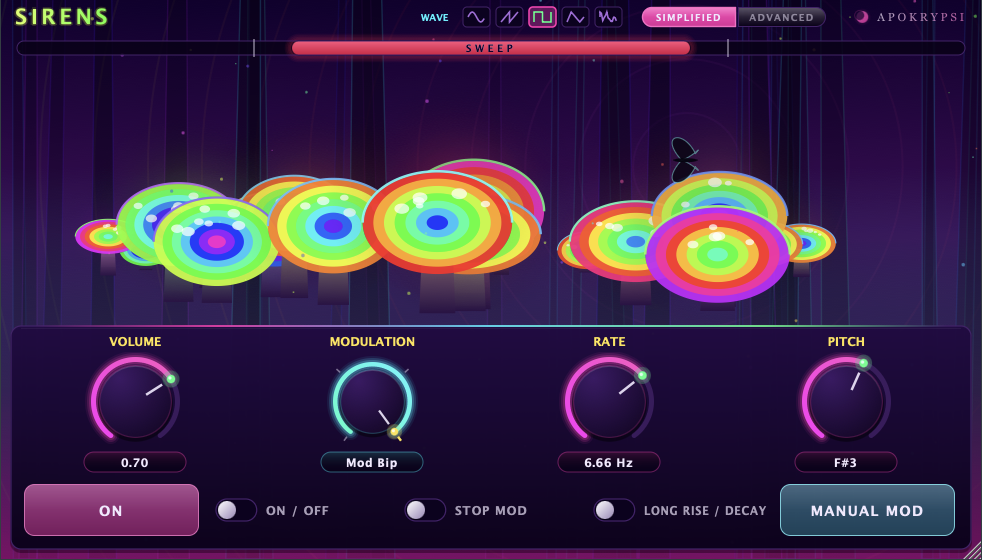
The default panel is a digital twin of the classic two-555 siren: Volume, Modulation, Rate and Pitch on four big dials, the ON push button, and the box’s own switches underneath. Nothing to learn if you have ever played one.
Four ways to wire it
The Modulation dial is a rotary switch, as on the hardware, and each position wires the two oscillators differently: Modulated slews between two tones, Bi-Tonal jumps between them, Bip-Bip chops tone and silence, and Mod Bip drops a falling tone into the gaps.
The circuit’s own switches
Stop Mod lets the pitch fall to the low tone and stay there. Long Rise / Decay swaps in the slow, lopsided sweeps of the big capacitors. Manual Mod pushes the pitch up for as long as you hold it, whatever the dial says.
Sweep and warp
Switch to the Advanced panel for the full knob row. Sweep depth runs up to three octaves, with triangle, ramp, square or random shapes. Warp modulates the speed of the sweep rather than its pitch, so the siren speeds up and stalls the way the real ones do.
Echo, spring and drive
A tape-style echo whose repeats get darker on every pass instead of turning into hiss, and whose pitch smears when you move its time while it rings. Then a spring reverb, a ladder filter and drive, for when the sound system is pushed a little too far.
Play it your way
Hold the ON button, hold the spacebar, or play it from any MIDI keyboard: a MIDI note takes over the pitch while held. Five oscillator waveforms, from square to noise. And keep an eye on the forest: something crosses it every now and then.
VST3 · Audio Unit · Standalone
macOS 11+, Apple Silicon & Intel